Hardware description
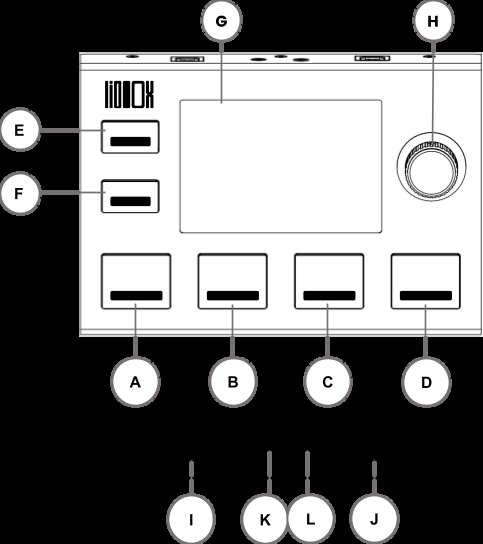
| Label | Element | Function |
|---|---|---|
| A, B, C, D | Pads A B C D | Pads assignable to various software functions or MIDI information |
| E | Pad E: MENU / BACK | Access the menu and return to the main screen |
| F | Pad F: BANK CHANGE / BACK | Change the pad bank and go back in submenus |
| G | Display | 3.5-inch color display |
| H | Clickable knob | Menu navigation and next/previous song selection/launch |
| I | USB A | Connection to the Master computer |
| J | USB B | Connection to the Spare computer |
| K | MIDI OUT | 3.5 mm jack MIDI output |
| L | MIDI IN | 3.5 mm jack MIDI input |
Pads (A, B, C, D)
The LIOBOX² has 6 RGB backlit silicone pads with click buttons. Each pad has a predefined function, but can also be modified as explained in Pad config.
Predefined functions
- A: PLAY: launches the next song selected. By default, after launching a song, the LIOBOX² automatically selects the next song in the list.
- B: RWD: a long press launches fast rewind. A single press selects the previous song without launching it. Double-clicking restarts the current song.
- C: FWD: a long press launches fast forward. A single press selects the next song without starting it.
- D: PAUSE: pauses playback. A second press resumes playback. During playback, a quick double press sends a STOP and places you on the first beat (1.1.1).
- E: MENU: enters the LIOBOX² menu to access settings and setlist functions. While in the menus, pressing the MENU pad takes you back to the home screen.
- F: BACK / BANK CHANGE: in the MENU screen, returns to the previous menu. In the MAIN screen, it allows selecting pad banks.
Clickable knob (H)
The clickable knob (or selective notched encoder) is used to move through the MENU options and validate the selection.
On the MAIN screen, the encoder is used to select the next song to be played by rotating it. The next song is launched by clicking on the encoder.
USB ports (I, J)
The LIOBOX² has two USB2 MIDI ports, named USB A and USB B (I and J respectively in the drawing above):
- USB A is recognized as "Liobox MASTER"
- USB B is recognized as "Liobox SPARE"
The LIOBOX² can also be connected to a single computer via the USB A port (as with the LIOBOX version 1).
Connecting two USBs enables redundancy.
Only the USB B port can enable a firmware update with the GoorooLink. See Device update.
Jack ports (K, L)
The LIOBOX² has two MIDI 3.5 mm jack ports:
- MIDI IN port: controls LIOBOX² internal functions from an external instrument
- MIDI OUT port: controls an external instrument
Display (G)
The LIOBOX² 3.5" screen displays customizable information, removing the need to have direct access to the DAW.
The MAIN screen can display (in ADVANCED mode):
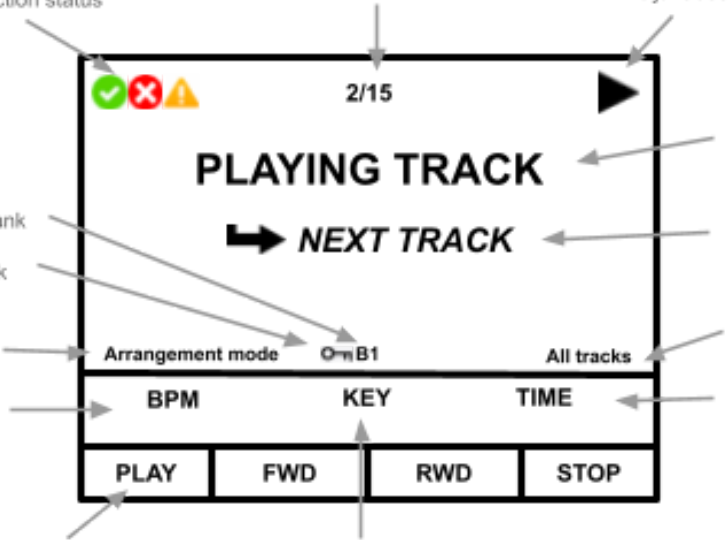
The MAIN screen can display more or less information depending on the selected setting. Refer to Screen preference to view all available options.
The MENU screens allow full customization of the LIOBOX² as well as setlist creation and navigation.