User interface overview
The user interface is divided into four sections:
- Menu bar
- Main section
- Context section
- Status bar
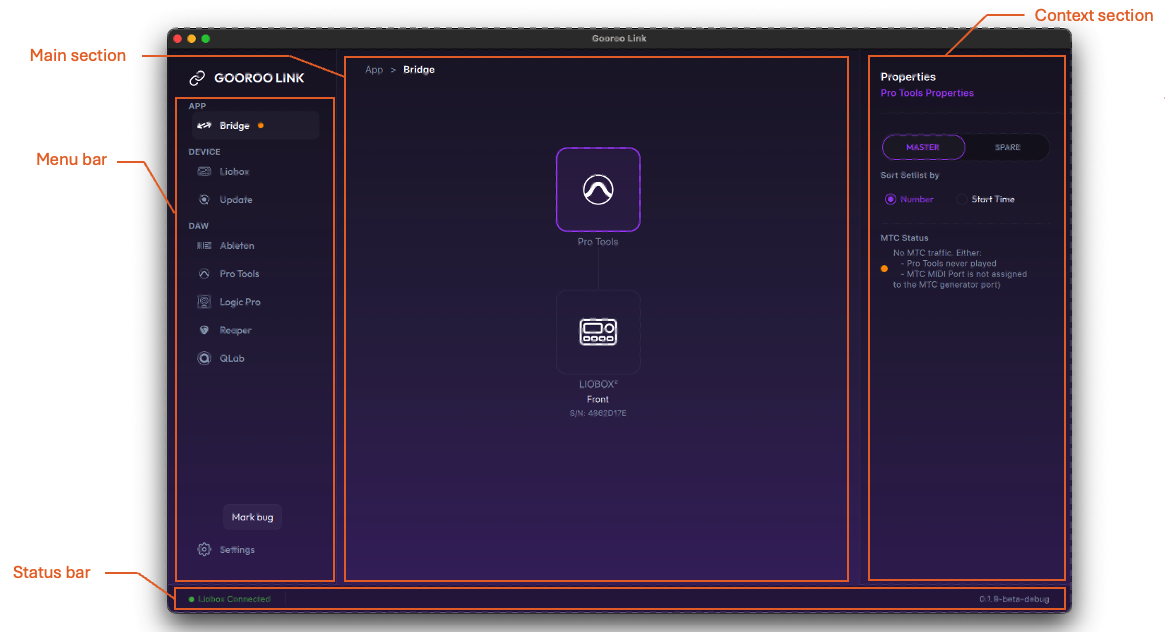
Views and features are described in the following sections.
Menus
Menus are divided into sections.
| Category | Description |
|---|---|
| APP | Modules interacting with DAWs to provide advanced control features |
| APP → BRIDGE | Module enabling all the advanced features of the LIOBOX² to the Digital Audio Workstations (DAWs) that do not permit scripting capabilities (Pro Tools, Logic Pro, Cubase, QLab). See BRIDGE. |
| DEVICE | Device management modules |
| DEVICE → LIOBOX | LIOBOX² management module, allowing to remotely configure the LIOBOX² and import or export configurations. See LIOBOX. |
| DEVICE → DEVICES | Manage connected devices and handle proxies. See Devices. |
| DAW | DAW information page. Retrieve the detected software versions and script compatibility, as well as DAW configuration information. See DAW. |
Status bar
The status bar displays the current state of the LIOBOX² connection:
| Element | Description |
|---|---|
| Device connection status | Displays the status of the device connection |
| Temporary messages | Located next to the device connection status, to provide feedback from ongoing actions. This information is displayed for a couple of seconds before disappearing. |
| Software version | Current software version running (more information is available in the Settings menu) |