DEVICE → LIOBOX
The DEVICE → LIOBOX module allows configuring all LIOBOX² parameters: setlists, pads and settings.
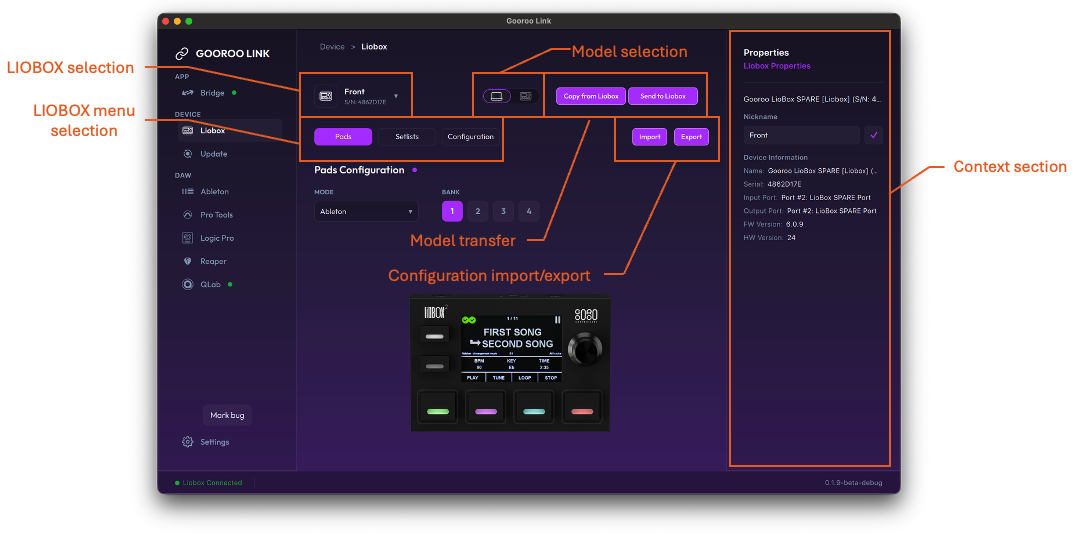
LIOBOX selection
Select a connected LIOBOX² to visualize the parameters of this specific LIOBOX².
Data model (model) concept
The data model (or model) is a description of all parameters saved in the LIOBOX².
- CACHED model: the model that can be modified without altering the actual LIOBOX² memory. This model is editable.
- LIOBOX² model: the exact content of the LIOBOX². This model is not editable directly. Use the transfer function (Send to LIOBOX) to replace the content of the LIOBOX² with the content of the CACHED model.
Model selection
Select which model to visualize:
- CACHED (laptop icon)
- Connected LIOBOX² (device icon)
Data model mismatches
A mismatch between the CACHED and LIOBOX² data models is represented by a "dot" next to the selected LIOBOX menu name.

Model transfer
The CACHED model is loaded with default values which might not match the currently connected LIOBOX² model. It is possible to either:
- Copy from LIOBOX: replace the CACHED model with the LIOBOX² data model. This operation is purely internal to GoorooLink.
- Send to LIOBOX: replace the LIOBOX² model with the content of the CACHED model. This operation involves transferring the data to the LIOBOX² through its USB link, which can take a couple of seconds.
Configuration import / export
The CACHED model can be saved and retrieved (exported and imported) to be reused:
- Import: replaces the content of the CACHED model (pads, setlists and settings) with the file content.
- Export: saves the content of the CACHED model in a file.
This is particularly useful when having multiple LIOBOX² on stage and needing to duplicate the configuration of the LIOBOX².
LIOBOX menu selection
Select the category of information to be displayed: Pads, Setlists or Configuration.
Pads configuration
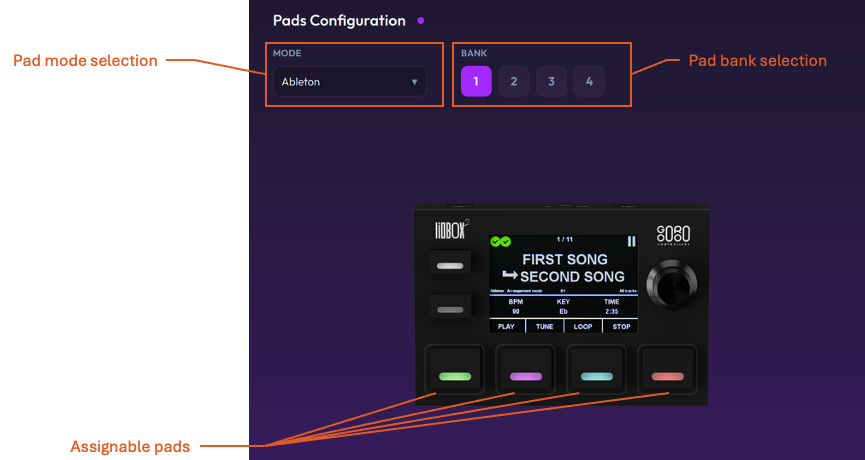
Pad mode selection and pad bank selection
Each assignable pad has a unique configuration depending on the selected mode and the selected bank.
Assignable pads
Click any of the four assignable pads to modify its function.
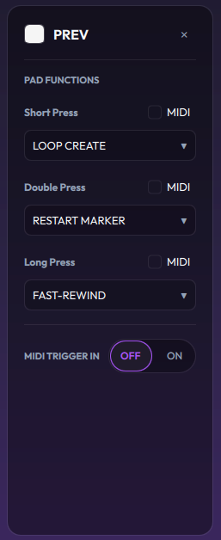
- Pad color: select the pad LED color.
- Pad name: name given to the pad (displayed in certain screen mode selections).
- Pad functions: list of pad functions for the Short press, Double press and Long press events (depends on the selected mode).
- MIDI Trigger In: activate/deactivate the pad MIDI IN.
Pad function = MIDI
When selected, the pad function transfers a MIDI note, control change or program change depending on the selection.
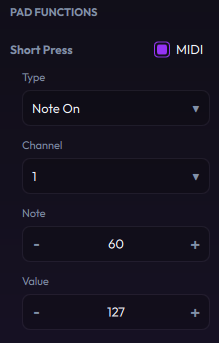
MIDI Trigger In enabled
When enabled (ON), the MIDI messages received on the LIOBOX² MIDI port are checked against these configured values. If matched, the LIOBOX² triggers the corresponding pad Short press function.
Value = Any: when checked, the value is not checked against the received MIDI message (any value from 0 to 127 is accepted).
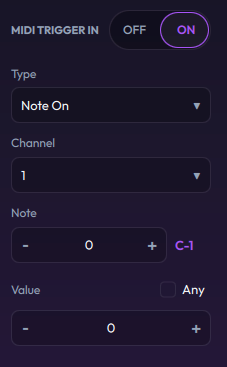
See also Pad config on the LIOBOX².
Setlists
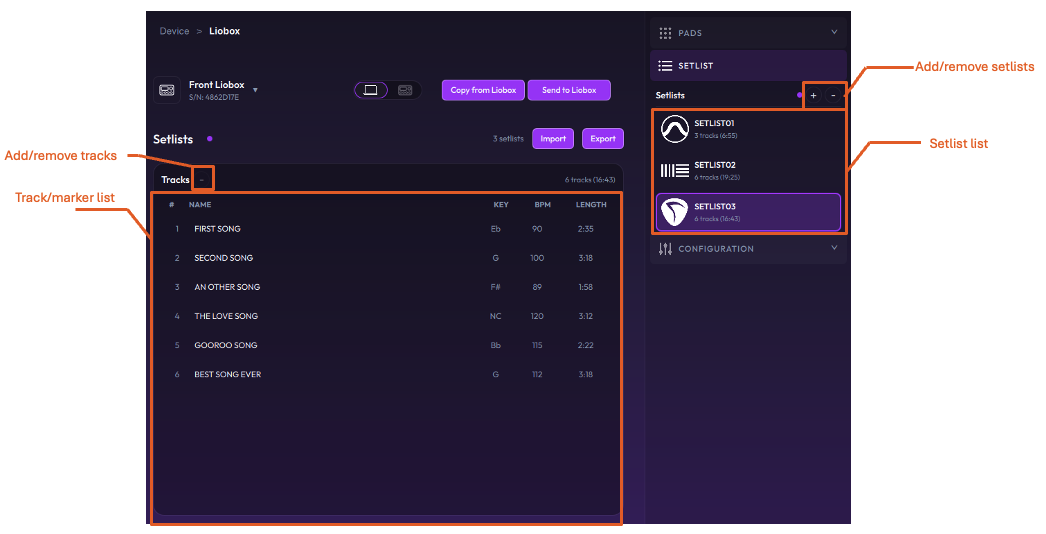
Setlist list
The list of setlists stored in the selected model, in order of creation. Setlists can be added or removed (only in the CACHED model).
Track/marker list
The list of tracks/markers stored in the selected model.
- Select and drag to change the order in the setlist.
- Markers can be removed from or added to the setlist using the corresponding buttons.
See also Setlists on the LIOBOX².
LIOBOX configuration
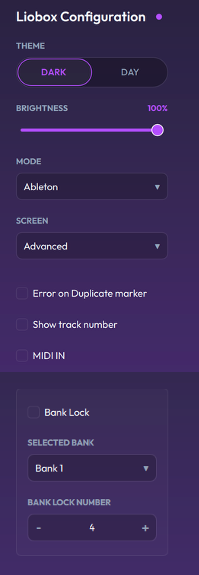
| Setting | Description |
|---|---|
| Theme | LIOBOX² display mode (dark or day) |
| Brightness | LIOBOX² display brightness |
| Mode | LIOBOX² mode selection (Ableton, Pro Tools, Logic Pro, Reaper, QLab, MIDI, all tracks, setlist mode, …) |
| Screen | LIOBOX² display layout |
| Error on duplicate marker | Displays an error if two markers have the same name (redundancy mode) |
| Show track number | Adds the track number before the displayed track name |
| MIDI IN | Enables the MIDI IN port of the LIOBOX² |
| Bank lock | Locks the bank selection to the currently selected bank |
| Selected bank | Selected bank number (1 – 4) |
| Bank lock number | Maximum bank number (1 – 4) |
Refer to the LIOBOX² user manual for more information about the usage of these settings, in particular the settings and bank management pages.