Auto-updates
When GoorooLink starts, it scans the Gooroo Controllers servers for the latest versions of the scripts (Ableton and Reaper), the GoorooLink software and the LIOBOX² firmware.
This allows checking cross-compatibilities and auto-updating if need be:
- LIOBOX² with GoorooLink
- LIOBOX² with Ableton scripts
- LIOBOX² with Reaper script
As a general rule, always make sure your systems are at the latest versions. New features and bug fixes are regularly released.
GoorooLink can report:
- Incompatibility: features will be inoperative at best, or the system will not be operative at all.
- Outdated: a newer version is available.
- Compatible: all features can be used.
Ensure you grant GoorooLink the rights to access and write to folders when prompted. See Auto-update fails.
GoorooLink software update
The GoorooLink software update is a 3-step process.
1. A newer version is detected. Hover over the button to retrieve more information about the newest version. Click to launch the download of this new version from the Gooroo Controllers servers.

2. The new version is being downloaded. Wait for the completion of the download. All the GoorooLink features remain available while the download is ongoing.

3. Install the new version. Click to install the new version. This closes and re-opens GoorooLink.

Closing GoorooLink without installing the new version resets this process.
LIOBOX² firmware update
Refer to Device update for the detailed procedure for updating the LIOBOX² firmware.
The LIOBOX² firmware status is shown in the menu bar, with an icon next to the Update menu element.
| Icon | Status |
|---|---|
| Warning (orange triangle) | LIOBOX² firmware incompatible. A firmware update is required to use LIOBOX² features with GoorooLink. |
| Information (purple dot) | LIOBOX² firmware outdated. A newer firmware is available but does not prevent using GoorooLink features. Nevertheless, compatibility with scripts might not be ensured. |
| None | LIOBOX² firmware compatible / up to date. The firmware is at its latest version and fully compatible with GoorooLink. |
Scripts update
Similarly, the script versions are also checked and can be updated through GoorooLink.
Script status
| Status | Description |
|---|---|
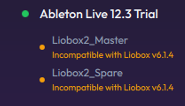 | Script incompatible. The detected LIOBOX² firmware version and the installed script will not work together. |
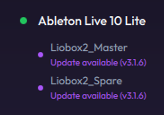 | Script outdated. A newer script is available, but the current one is compatible with the current LIOBOX². |
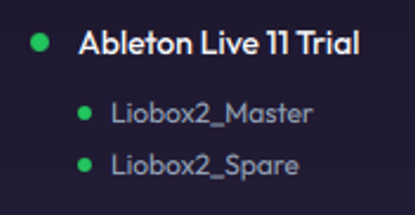 | Script compatible / up to date. The script is up to date and compatible with the detected LIOBOX² firmware version. |
Script update process
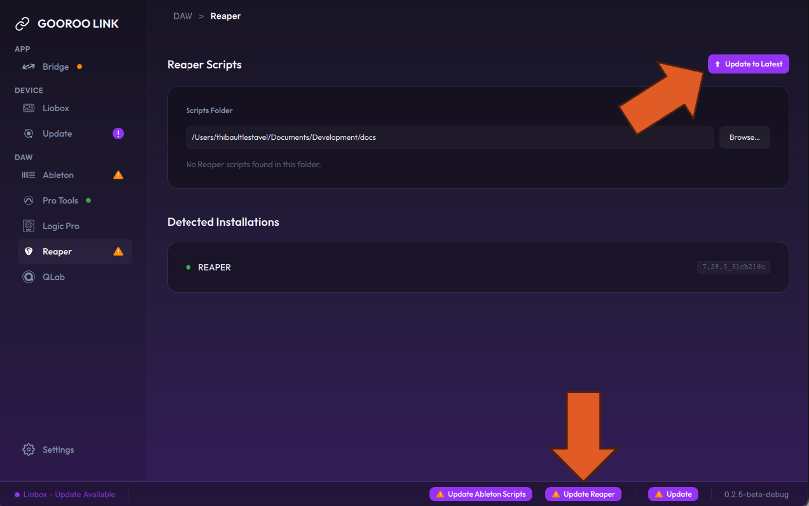
The script can be updated simply by clicking the Update Script button, either in the status bar or inside the DAW view.